
Bodybuilding show software · Any federation
Run the whole show.
From first entry to final placing. No spreadsheets, no USB sticks, no paper scorecards.
No subscription. No setup fee. No cut of your entry fees.
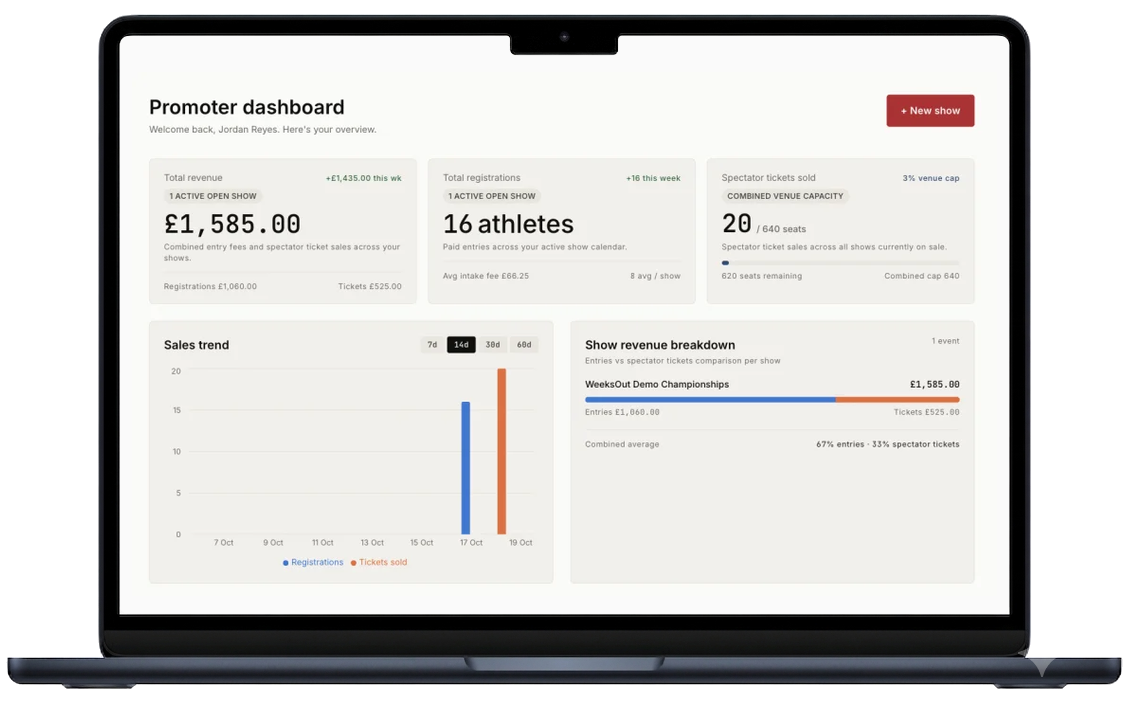
Everything between announcement and awards.
Online registration
Athletes pick their classes, sign the declaration, and pay from their phone. No paper forms. No payments to chase.
Crossovers
One athlete, one competitor number, every class they entered. A flat crossover fee per extra class, added at checkout.
Direct payments
Payments run through your own Stripe account. Entry fees settle directly to you — WeeksOut never holds your money.
Posing music
Routine divisions upload before show day. Tracks trim to routine length. Remind everyone still missing a track in one go, then download the lot as a ZIP.
Check-in
Competitor numbers, class corrections, walk-ins, and class counts on one screen. Hand your helpers a staff link — no account needed.
Paperless judging
Judges rank from their phones, with or without signal. Duplicate placings are impossible. Ties break by your federation's rules. Every card and correction is logged.
Live results & MC sheet
Results go public class by class, the moment each is confirmed. The MC sheet follows your running order, awards included.
Spectator tickets
Sell tickets from the show page. Door staff scan QR codes on their own phones, and admissions keep saving if the Wi-Fi drops.
Sponsors
Put a sponsor on the show page, the results page, athlete emails, and tickets. Each one gets a report you can forward at renewal.
The whole platform works in English, Spanish, and Portuguese.
From weeks out to results.
- 01
Set up
Divisions, classes, entry fees, early-bird pricing, refund policy. Your federation's scoring rules come with the show. You pick the panel size.
- 02
Registration
Athletes pick their classes and pay online. Crossovers are added at checkout. Entry fees settle straight to your Stripe account.
- 03
Show week
Posing music is in, trimmed to routine length. Competitor numbers follow your running order. Judges have their sign-in links.
- 04
Check-in
Search, check in, correct a class, take a walk-in. The checked-in lineup is the one your judges rank.
- 05
Judging & results
Judges rank each class from their phones. The head judge confirms. The public results page updates that moment — never before.
30 minutes. Ask anything about your show.
Questions promoters ask.
Anything else, ask us directly — the contact form is at the bottom of the page.
What does WeeksOut cost promoters?
No subscription, no setup fee, and WeeksOut takes no cut of your entry fees. Athletes pay a small booking fee at checkout — that is what funds the platform. Stripe's card processing fee applies, as on any card payment. Sponsor placements are optional and carry a one-off fee, shown before you activate one.
When do I get paid?
As athletes register. Entry fees settle straight to your Stripe account — not into a platform ledger after the show. Payouts to your bank follow your normal Stripe schedule.
How do I get started?
Book a demo. Promoter accounts are opened by invitation, so yours is sent after the call. Then connect your Stripe account, create the show, and publish.
Does it score the way my federation scores?
Your federation's rules come with the show: the drop rule, the tie-break chain, the panel sizes it allows. You pick the panel size. Independent shows run too.
What happens if the venue Wi-Fi dies?
Judging keeps working. Rankings save to the judge's phone first and sync when signal returns — each judge just opens their link once with a connection beforehand. Ticket scanning at the door works the same way. A class cannot be confirmed until every judge's card is in, so nothing is lost and nothing publishes early.
Do judges need special hardware?
No. Each judge gets a sign-in link by email and ranks from their own phone in the browser — no password. Each rank is used exactly once, so duplicate placings are impossible.
What if a judge's phone dies, or they want paper?
Enter their paper card at the scoring desk. It counts as that judge's card and is logged as a paper entry.
Can athletes enter more than one class?
Yes. Crossovers are added at checkout at a flat fee per extra class, and your entry list shows every class an athlete holds. You decide whether to allow crossovers and set the fee.
How do results get published?
The head judge confirms each class, and the public results page updates that moment — never before. The link is shareable and spectators need no login.
What about refunds?
Your refund policy, set per show: full refund until one date, credit or transfer only until another, nothing after — or no refunds at all. Entry-fee refunds follow it and reverse correctly through Stripe. The athlete booking fee is non-refundable, disclosed at checkout.
Set up your show in 10 minutes.
Registration. Music. Check-in. Scoring. Done.
No subscription, no setup fee. Entry fees settle straight to your Stripe account — WeeksOut never holds your money.
Contact us.
Running shows on WeeksOut, or thinking about it? Send a message — we reply by email.
For promoters and federation officials. Athletes: your promoter answers registration, music, and check-in questions fastest — their contact is on the show page.